Built for the work between orders

A cleaner shift for every Dasher.

No Tipper is an iOS app for Dashers and delivery drivers. Track mileage, estimate gas, and prepare customer updates without piecing your shift together afterward.

App access requires a subscription. Review current plans and any trial eligibility in the app before subscribing.

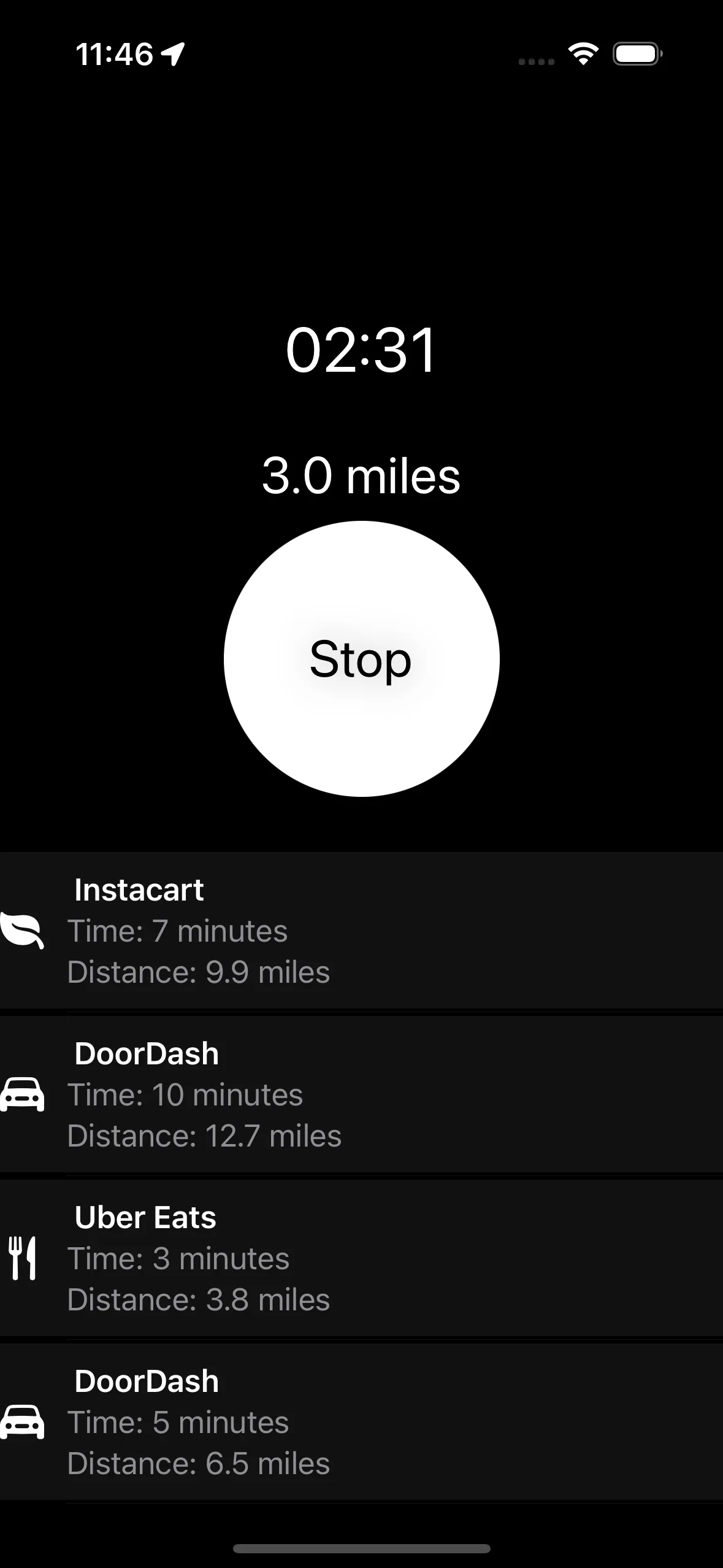
No Tipper active delivery trip screen

What No Tipper is.

No Tipper is an iOS app for Dashers and other delivery drivers. It records trip time and mileage, estimates gas cost from your vehicle's MPG and the gas price you pay, prepares rule-based customer messages, and exports trip records as CSV or PDF. Export is part of No Tipper Pro.

Trip fuel estimate

Gas estimator for a delivery trip

Enter the trip miles, your vehicle's MPG, and the price per gallon. The estimate covers fuel only, not maintenance, insurance, depreciation, tolls, or other costs.

See the formula and worked example
Estimated fuel cost$3.40$0.14 per mile

Useful numbers before the next drive.

Transparent formulas, editable assumptions, and no account required.

Plain answers

Direct answers for delivery drivers

How should a delivery driver compare a cheaper gas station?

Compare the pump discount with the fuel used for the detour: extra miles ÷ MPG × price per gallon versus cents saved per gallon × gallons bought. No Tipper does not find stations or live prices, but it can use the price you confirm with your trip miles and vehicle MPG to estimate fuel cost.

Where can I check nearby gas stations and prices?

Use Costco’s warehouse locator to check locations with gas and GasBuddy to compare reported local prices. No Tipper does not search stations, show live prices, or provide directions. After choosing a station, enter the pump price you actually pay with your trip miles and vehicle MPG to estimate fuel cost.

How can I track my DoorDash miles?

Keep a mileage log during your shift and review it afterward. No Tipper is an iOS app for delivery drivers that records trip time and mileage, supports manual trip entry, and exports selected records as CSV or PDF through No Tipper Pro.

How do I estimate gas cost for a delivery trip?

Divide trip miles by your vehicle’s MPG, then multiply by the price per gallon. The calculator shows estimated fuel cost and cost per mile. It does not include maintenance, insurance, depreciation, tolls, or other vehicle costs.

Does No Tipper show live gas station prices?

No Tipper does not list live local gas prices. Enter the pump price you actually pay, your trip miles, and your vehicle’s MPG to estimate fuel cost.

BeforeSet useful inputs DuringTrack the delivery AfterReview the record

One route through the shift.

No Tipper keeps the small details together when you are driving, waiting, delivering, and closing out the day.

Before the first order

Give the estimate real inputs.

Set your vehicle's MPG and the gas price you are actually paying. Those values make the trip-level fuel estimate useful instead of generic.

Read the gas-cost guide

During the delivery

Keep the useful numbers in view.

Review elapsed time, mileage, and estimated gas cost between stops. When timing, access, or weather matters, prepare a rule-based customer update from the delivery context already at hand.

See message examples

After the last drop-off

Close the loop while the route is familiar.

Review recent trips by date, distance, duration, and category. Correct the record, then export the history you need as CSV or PDF. For reference, the IRS business standard mileage rate was 72.5 cents per mile from January 1 to June 30, 2026, and 76 cents per mile from July 1 to December 31, 2026.

Use the mileage checklist

Practical Dasher guides.

Direct answers for the recordkeeping and communication work around a delivery shift—without copied platform help text or keyword filler.

19 focused guides
Shift fuel cost

Delivery fuel cost for one multi-app shift

Calculate delivery fuel cost from one saved shift, then keep that gas estimate separate from a broader vehicle-cost benchmark.

Read the guide

Quick answers for drivers.

No inflated promises—just the boundaries of what the app does.

How should a delivery driver compare a cheaper gas station?

Compare the pump discount with the fuel used for the detour: extra miles ÷ MPG × price per gallon versus cents saved per gallon × gallons bought. No Tipper does not find stations or live prices, but it can use the price you confirm with your trip miles and vehicle MPG to estimate fuel cost.

Where can I check nearby gas stations and prices?

Use Costco’s warehouse locator to check locations with gas and GasBuddy to compare reported local prices. No Tipper does not search stations, show live prices, or provide directions. After choosing a station, enter the pump price you actually pay with your trip miles and vehicle MPG to estimate fuel cost.

How can I track my DoorDash miles?

Keep a mileage log during your shift and review it afterward. No Tipper is an iOS app for delivery drivers that records trip time and mileage, supports manual trip entry, and exports selected records as CSV or PDF through No Tipper Pro.

How do I estimate gas cost for a delivery trip?

Divide trip miles by your vehicle’s MPG, then multiply by the price per gallon. The calculator shows estimated fuel cost and cost per mile. It does not include maintenance, insurance, depreciation, tolls, or other vehicle costs.

Does No Tipper show live gas station prices?

No Tipper does not list live local gas prices. Enter the pump price you actually pay, your trip miles, and your vehicle’s MPG to estimate fuel cost.

Does No Tipper track acceptance rate?

No. The app focuses on trip time, mileage, gas estimates, customer messages, and exportable records.

Can I add or correct a trip manually?

Yes. Manual trip entry and review help you correct a record when an automatic trip needs attention.

Are the gas numbers exact vehicle costs?

No. They are estimates based on miles, MPG, and gas price and do not include maintenance, insurance, depreciation, tolls, or other costs.

Can I use No Tipper with other delivery platforms?

Yes. The trip, mileage, fuel-estimate, message, and export workflow can be useful across delivery platforms.


Ready for the next shift?

Keep the work between orders in one place.

App access requires a subscription. Review current plans and any trial eligibility in the app before subscribing.

Open in the App Store